Test the Agent locally
Overview
After creating a Warden Agent, you can run it locally and interact with it using the CLI and other methods. The sections below explain how to do it.
1. Run the Agent
-
In a new terminal window, navigate to your Agent directory and compile TypeScript:
npm run build -
Now you can run the Agent:
npm startIf you need to temporarily disable x402 payments at start, run this command:
X402=false npm startIt skips the payment middleware only for the current process: your
.envfile with x402 settings will stay untouched, and payments will resume on the next start. -
Congratulations! Your Agent is available on the local host:
http://localhost:3000While the Agent running, you can interact with it as shown in the sections below.
To stop the Agent, press CTRL+C. Don't forget to rebuild it each time you update the code.
2. Interact with the Agent
Chat using the UI
The fastest way to make sure your Agent is to open the local host URL:
http://localhost:3000
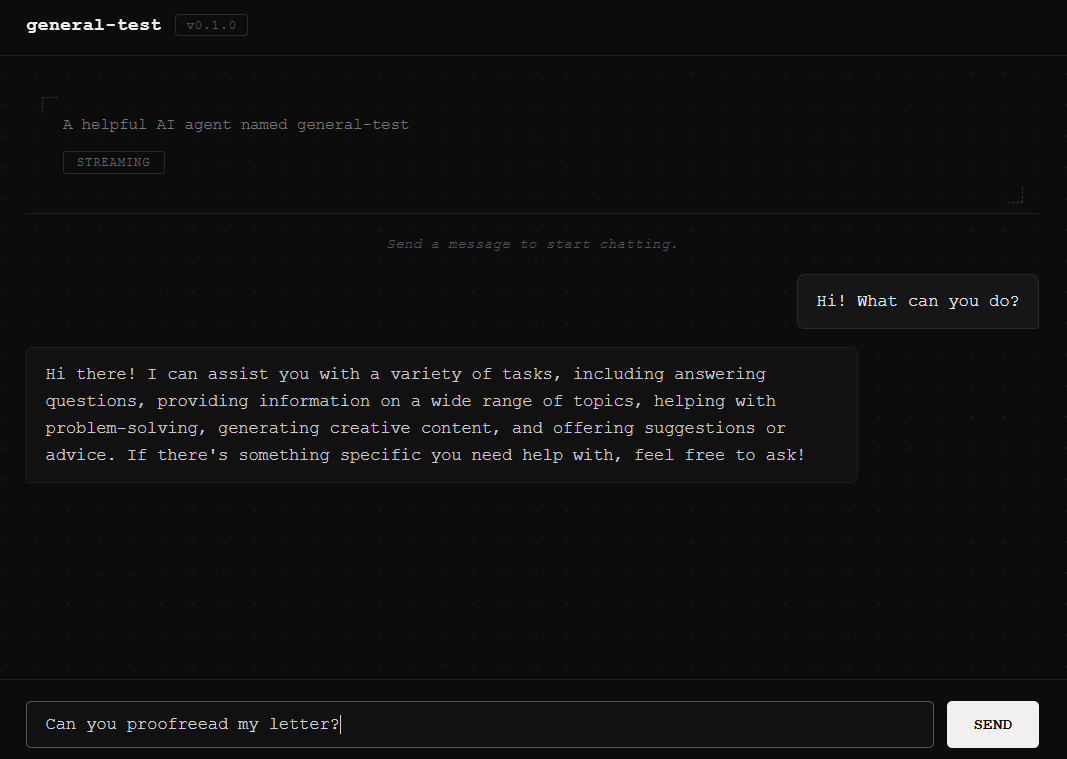
If everything is fine, you'll be able to chat with your Agent through the user interface provided by Warden Code:
Chat using the CLI
To chat with your Agent through the CLI, take these steps:
-
Navigate to your project's root directory and initiate Warden Code:
warden -
Enter the chat mode and specify the Agent URL:
/chat http://localhost:3000Alternatively, you can chat with the Agent in the build mode:
/build
/chat -
Chat with your Agent. Warden Code automatically detects whether the agent supports A2A, LangGraph, or both, and prompts you to choose when multiple protocols are available.
tipThe
/chatcommand automatically uses API key authentication to bypass x402 payments. It'll work if you keep theAGENT_API_KEYvariable in the.envfile. -
To exit the chat mode, type this:
/exit
Chat using the API
Every new Agent is immediately accessible through A2A and LangGraph server endpoints exposed by Warden Code.
For a full list, see A2A endpoints & methods and LangGraph endpoints.
After running your Agent, you can try any of these endpoints locally. For example, you can prompt the Agent using the A2A POST endpoint with the message/send method.
In the request below, replace AGENT_API_KEY with your Agent API key for authentication, which you can find in the .env file:
- Postman
- cURL
POST http://localhost:3000
Headers: Content-Type: application/json
Authorization: Type: Bearer Token, Token: AGENT_API_KEY
Body:
{
  "jsonrpc": "2.0",
  "id": "",
  "method": "message/send",
  "params": {
    "message": {
      "role": "user",
      "parts": [
        {
          "kind": "text",
          "text": "What can you do?"
        }
      ],
      "messageId": ""
    },
    "thread": {
      "threadId": ""
    }
  }
}
curl http://localhost:3000 \
  --request POST \
  --header 'Content-Type: application/json' \
  --header 'Authorization: Bearer AGENT_API_KEY' \
  --data '{
    "jsonrpc": "2.0",
    "id": "",
    "method": "message/send",
    "params": {
      "message": {
        "role": "user",
        "parts": [
          {
            "kind": "text",
            "text": "What can you do?"
          }
        ],
        "messageId": ""
      },
      "thread": {
        "threadId": ""
      }
    }
  }'
If everything is fine, you'll receive a response including your prompt, assistant's reply, and other data:
{
    "jsonrpc": "2.0",
    "result": {
        "id": "task-2",
        "context_id": "da79d131-143c-4154-b617-c25945774648",
        "status": {
            "state": "completed",
            "timestamp": "2026-02-09T08:03:07.107Z"
        },
        "kind": "task",
        "history": [
            {
                "role": "user",
                "parts": [
                    {
                        "kind": "text",
                        "text": "What can you do?"
                    }
                ],
                "messageId": "",
                "kind": "message",
                "message_id": "5646cc50-ae72-40a9-87e6-99477e050a4f"
            },
            {
                "role": "agent",
                "parts": [
                    {
                        "kind": "text",
                        "text": "I can assist with a variety of tasks, including but not limited to:\n\n1. Answering questions and providing information on a wide range of topics.\n2. Assisting with problem-solving and brainstorming ideas.\n3. Offering writing support, including proofreading, editing, and generating text.\n4. Providing summaries and explanations of complex concepts.\n5. Helping with language translation and learning.\n6. Offering recommendations for resources, books, or tools.\n7. Engaging in casual conversation and providing companionship.\n\nIf you have a specific request or need assistance with something else, feel free to ask!"
                    }
                ],
                "kind": "message",
                "message_id": "d187905d-2ded-41e5-87ae-db02ee011d88"
            }
        ]
    },
    "id": ""
}
Check the Agent Card
As part of the A2A protocol support, Warden Code exposes an endpoint for the A2A Agent Card, which advertises your Agent's skills. It allows other Agents and clients to discover your Agent once you publicly host it.
To check the Agent Card accessibility, run this:
http://localhost:3000/.well-known/agent-card.json
The card will display your Agent's name and capabilities, along with other information:
{
    "name": "general-test",
    "description": "A helpful AI agent named general-test",
    "url": "http://localhost:3000",
    "version": "0.1.0",
    "capabilities": {
        "streaming": true,
        "multiTurn": false
    },
    "skills": [],
    "defaultInputModes": [
        "text"
    ],
    "defaultOutputModes": [
        "text"
    ]
}
You can edit the Agent Card at any time. Use the /config command or other methods, as shown in Configure the Agent.
Next steps
After local testing, you can host your Agent to make it publicly available.